How to Clean the Mighty+ Medic Vaporiser: Step-by-Step Guide
If your Mighty+ Medic feels harder to draw from, tastes stale or produces less vapour than usual, it may be due for a clean. Over time, residue can build up inside the cooling unit, mouthpiece, screens and filling chamber, which can affect airflow, flavour and overall performance.
The good news is that cleaning the Mighty+ Medic is straightforward once you know which parts can be removed, which parts can be soaked and which parts need to stay dry.
This guide walks you through how to clean your Mighty+ Medic safely, how often to clean it, which mistakes to avoid and when small parts may need replacing.
If you are new to dry herb vaporisers, you can also browse CannaDash’s dry herb vaporiser range or visit the CannaDash Knowledge Hub for more product guides and educational resources.
Why Cleaning Your Mighty+ Medic Matters
Regular cleaning helps keep your Mighty+ Medic performing as intended. It can help with:
- Better airflow
- Cleaner flavour
- More consistent vapour production
- Reduced draw resistance
- Easier loading and emptying
- Longer-lasting small parts
- Better overall device performance
Most cleaning issues come from residue inside the cooling unit or clogged screens. A quick brush after use and regular deep cleaning can make a noticeable difference.
How Often Should You Clean the Mighty+ Medic?
The right cleaning schedule depends on how often you use your vaporiser and whether you use dosing capsules.
| Use Level | Light Cleaning | Deep Cleaning |
|---|---|---|
| Occasional use | Brush the chamber after each use | Every 3–4 weeks or when residue appears |
| Regular use | Brush the chamber after each use | Every 1–2 weeks |
| Daily or heavy use | Brush the chamber after each use | Weekly or when airflow changes |
As a general rule, clean the cooling unit weekly or whenever you notice visible residue, restricted airflow, stale flavour or a sticky mouthpiece.
Signs Your Mighty+ Medic Needs Cleaning
Your device may be overdue for cleaning if you notice:
- Restricted airflow
- Increased draw resistance
- Reduced vapour production
- Bitter or stale flavour
- Sticky mouthpiece
- Visible residue inside the cooling unit
- Clogged screens
- Uneven extraction
If these issues appear, a thorough clean will often help restore normal performance.
What You Need Before You Start
Before cleaning your Mighty+ Medic, gather the following supplies:
Essential Supplies
- 70% isopropyl alcohol, used according to the manufacturer’s guidance
- Cotton buds
- Paper towel
- Warm water
- Mild detergent, if using warm detergent water instead of alcohol
- Mighty+ cleaning brush
- Small container for soaking removable parts
Optional Replacement Parts
- Replacement screens
- Replacement O-rings
- Replacement cooling unit
- Replacement mouthpiece
- Dosing capsules
These items are useful to keep on hand, especially if you use your Mighty+ Medic regularly. You can browse Mighty+ Medic accessories through CannaDash.
Before You Start: What Can and Cannot Be Soaked
One of the most important parts of cleaning the Mighty+ Medic is knowing which parts can be soaked and which parts must stay dry.
| Can Usually Be Cleaned Separately | Do Not Soak |
|---|---|
| Removable cooling unit parts | Main Mighty+ Medic device body |
| Mouthpiece | Heating chamber electronics |
| Screens | USB-C charging port |
| Removable cooling unit housing | Device housing |
| Some removable small parts, if cleaned gently | Any non-removable electronic component |
Only soak removable parts that are designed to be cleaned separately. Do not soak the main device body or allow liquid to enter the filling chamber, charging port or internal electronics.
Step-by-Step Mighty+ Medic Cleaning Guide
Follow these steps carefully to clean your Mighty+ Medic safely.
Step 1: Turn Off the Device and Let It Cool
Switch the Mighty+ Medic off completely and allow it to cool to room temperature.
Do not clean the device while it is hot. This reduces the risk of burns and helps protect the device components.
Step 2: Remove the Cooling Unit
Twist the cooling unit approximately a quarter turn and lift it away from the filling chamber.
Place the main device body aside in a safe, dry location.
Step 3: Empty and Brush the Filling Chamber
Remove any remaining dry herb from the chamber.
Use the included cleaning brush to remove loose particles from:
- Filling chamber
- Chamber rim
- Screen area
A quick brush after each session is one of the easiest ways to reduce build-up and make deep cleaning easier.
Step 4: Disassemble the Cooling Unit
Carefully separate the removable cooling unit parts. This may include:
- Upper cooling unit housing
- Lower cooling unit housing
- Mouthpiece
- Screens
- O-rings or seal rings
Take note of how each part fits together before cleaning. This makes reassembly easier.
Clean small seals gently and inspect them for signs of wear, cracking or looseness. Replace them if they no longer sit properly.
Step 5: Soak Suitable Removable Parts
Place suitable removable cooling unit parts into a small container with 70% isopropyl alcohol.
Soak for a maximum of 30 minutes. Do not extend the soak time, especially for plastic components.
For heavier residue, use a cotton bud or soft brush after soaking rather than leaving parts in alcohol for longer.
Warm detergent water can also be used as an alternative cleaning method.
Step 6: Clean Screens and Airflow Channels
After soaking, use cotton buds or a soft brush to remove loosened residue.
Pay close attention to:
- Fine mesh screens
- Mouthpiece openings
- Internal airflow channels
- Areas where sticky residue has built up
Avoid aggressive scrubbing, as this can damage screens or small seals.
Step 7: Rinse Thoroughly
Remove the parts from the cleaning solution and rinse them thoroughly with warm water.
Make sure no alcohol, detergent or loosened residue remains on any component.
Step 8: Dry Completely
Place all cleaned parts on paper towel and allow them to air dry completely.
This step is important. Do not reassemble the Mighty+ Medic while moisture remains inside the cooling unit, mouthpiece or screens.
All cleaning vapours must fully evaporate before the device is used again.
Step 9: Reassemble the Cooling Unit
Once all components are fully dry, reassemble the cooling unit carefully.
Check that:
- Screens sit flat
- O-rings are seated correctly
- The mouthpiece rotates properly
- The cooling unit closes securely
If any part feels loose, damaged or difficult to fit, it may need replacing.
Step 10: Run the Device Empty Before Use
Once the device is fully dry and reassembled, run it empty at a high temperature before your next use.
This can help clear any remaining moisture or cleaning odour. Only use the device once all parts are dry and any cleaning vapours have evaporated.
How to Clean the Mighty+ Medic Cooling Unit
The cooling unit is where most residue collects. As vapour passes through the cooling pathway, oils and plant material can condense on the internal surfaces.
Over time, this residue can restrict airflow and affect flavour.
To clean the cooling unit:
- Remove it from the device.
- Separate the removable parts.
- Soak suitable parts in 70% isopropyl alcohol for no more than 30 minutes.
- Use cotton buds or a soft brush to remove residue.
- Rinse all parts thoroughly with warm water.
- Allow every part to dry completely before reassembly.
Regular cooling unit cleaning usually has the biggest impact on airflow and vapour quality.
How to Clean the Filling Chamber
The filling chamber requires more care than the cooling unit because it is part of the main device body.
After Each Session
Once the device has cooled:
- Empty the chamber
- Brush out loose material
- Check the rim for residue
- Keep the screen area clear
This simple habit can reduce the need for deeper cleaning.
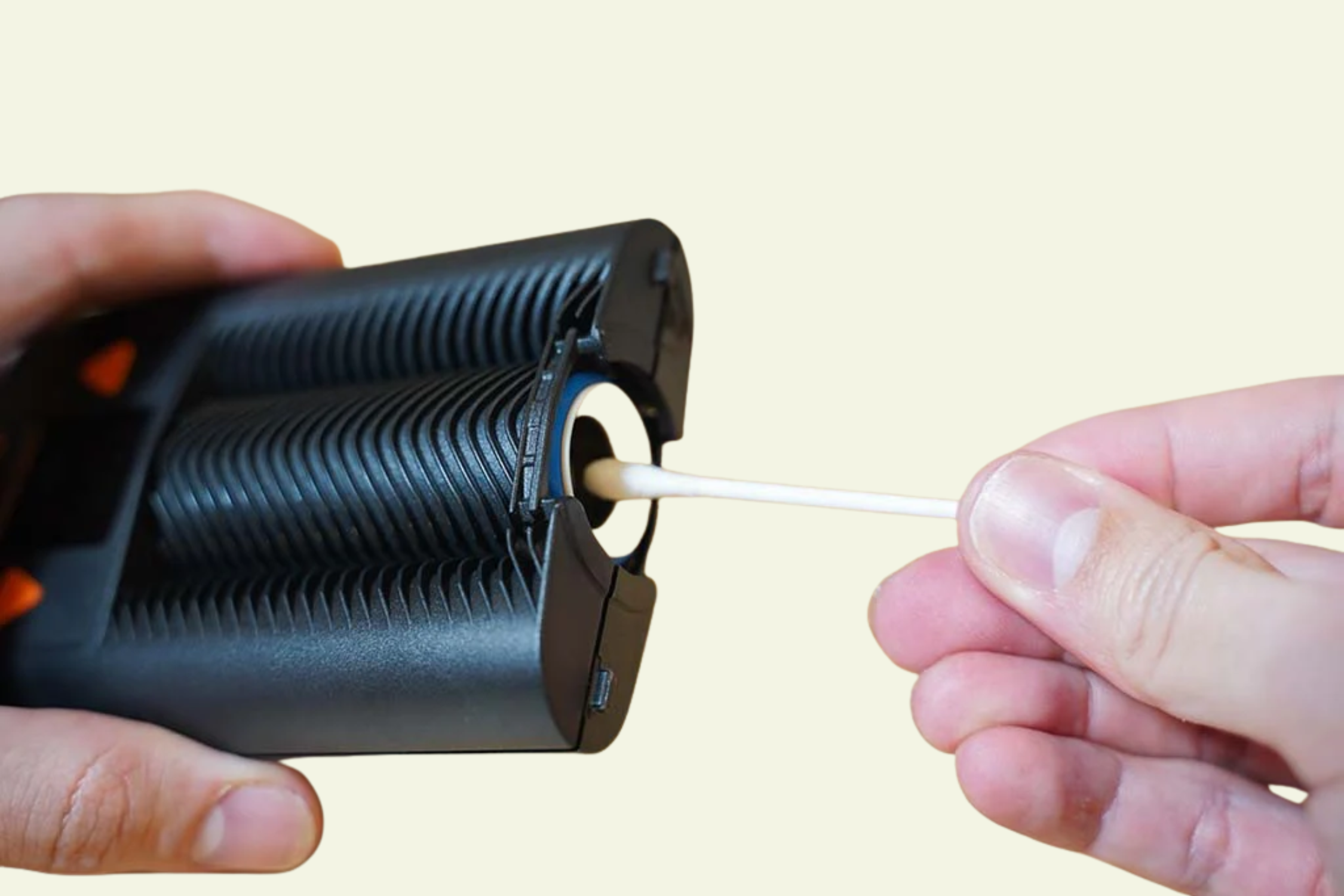
Deep Cleaning the Filling Chamber
For stubborn residue:
- Hold the device upside down.
- Lightly dampen a cotton bud with isopropyl alcohol.
- Gently wipe the chamber walls and rim.
- Avoid using too much liquid.
- Allow the chamber to dry completely.
The cotton bud should be damp, not dripping.
Important Warning
Never pour alcohol directly into the filling chamber. Excess liquid can enter areas that are not designed for moisture and may damage the device.
Common Mighty+ Medic Cleaning Mistakes
Using Too Much Alcohol
Alcohol should be used carefully, especially near the filling chamber. When cleaning the main device body or chamber area, use only a lightly dampened cotton bud or cloth.
Soaking Parts for Too Long
Do not soak plastic parts for longer than recommended. For the cooling unit, follow the manufacturer’s maximum soak time of 30 minutes.
Reassembling While Wet
Moisture trapped inside the cooling unit can affect flavour and performance. Always let every part dry completely before reassembly.
Neglecting Screens
Dirty screens are one of the most common causes of restricted airflow. Clean them regularly and replace them when they become damaged or permanently clogged.
Scrubbing O-Rings Too Aggressively
Seal rings can wear over time. Clean them gently and replace them if they become cracked, flattened, loose or damaged.
Skipping a Dry Run
After cleaning, running the device empty at a high temperature can help clear remaining moisture or cleaning odour before use.
Troubleshooting: What Your Cleaning Issue Might Mean
| Problem | Likely Cause | What to Do |
|---|---|---|
| Harder to inhale | Residue in cooling unit or clogged screen | Clean cooling unit and inspect screens |
| Weak vapour | Restricted airflow or residue build-up | Clean cooling unit and filling chamber |
| Stale flavour | Dirty mouthpiece or cooling unit | Deep clean removable parts |
| Sticky mouthpiece | Resin build-up | Soak and rinse suitable mouthpiece parts |
| Airflow still poor after cleaning | Damaged screen, seal or cooling unit | Replace worn parts or contact support |
| Cleaning smell remains | Parts not fully dry | Let parts dry longer and run the device empty |
If cleaning does not improve performance, inspect the cooling unit, screens and seals. If parts are damaged or no longer fit securely, replacement parts may be needed.
When Should You Replace Mighty+ Medic Parts?
Even with regular cleaning, some parts naturally wear over time.
Screens
Replace screens if they become:
- Bent
- Torn
- Permanently clogged
- Difficult to clean
- Loose or misshapen
O-Rings and Seals
Replace O-rings if you notice:
- Cracking
- Flattening
- Air leaks
- Loose fitting
- Visible damage
Mouthpiece
Replace the mouthpiece if:
- Rotation becomes loose
- Cracks develop
- Cleaning no longer restores it properly
- It feels sticky or worn after cleaning
Cooling Unit
Consider replacing the cooling unit if:
- Airflow remains restricted after cleaning
- Plastic parts are damaged
- Components no longer fit securely
- Cleaning no longer restores normal performance
Keeping spare parts on hand can make maintenance easier and reduce downtime.
Tips to Keep Your Mighty+ Medic Cleaner for Longer
Empty the Chamber After Every Session
Leaving used material inside the chamber encourages residue build-up. Emptying it after each session makes cleaning easier.
Use Dosing Capsules
Dosing capsules can help reduce loose material and residue inside the filling chamber.
Benefits may include:
- Less chamber contamination
- Faster loading
- Easier maintenance
- More consistent amounts
- Longer time between deep cleans
Brush Regularly
A quick brush after each session can dramatically reduce how often you need to deep clean the device.
Store It Properly
Keep your Mighty+ Medic in a clean, dry location. Avoid dusty environments, moisture and excessive heat.
Avoid Overpacking
Overfilled chambers can restrict airflow and increase residue build-up. Use an appropriate amount of dry herb and avoid packing the chamber too tightly.
FAQs About Cleaning the Mighty+ Medic
Can I soak the entire Mighty+ Medic?
No. Never soak the main Mighty+ Medic device body. Only suitable removable parts, such as the cooling unit components, should be cleaned separately.
Can I soak the cooling unit?
Yes, suitable removable cooling unit parts can be soaked according to the manufacturer’s instructions. STORZ & BICKEL recommends 70% isopropyl alcohol for a maximum of 30 minutes, or warm detergent water as an alternative.
Can I use water instead of alcohol?
Warm detergent water can be used as an alternative for cleaning removable cooling unit parts. Isopropyl alcohol is often more effective for sticky residue, but it must be used carefully and only on suitable removable parts.
How often should I clean my Mighty+ Medic?
Most users should brush the filling chamber after each session. The cooling unit should generally be cleaned weekly or when visible residue, restricted airflow or stale flavour appears.
Why does my Mighty+ Medic have restricted airflow?
Restricted airflow is often caused by clogged screens, residue in the cooling unit or build-up in the vapour pathway. Cleaning the cooling unit and inspecting the screens will often help.
Can cleaning improve vapour production?
Yes. Cleaning can help restore airflow and vapour consistency if residue or clogged screens are affecting performance.
What strength of isopropyl alcohol should I use?
For the Mighty+ Medic cooling unit, STORZ & BICKEL recommends 70% isopropyl alcohol for a maximum of 30 minutes. Always rinse and dry parts thoroughly before reassembly.
Are dosing capsules worth using?
Many users find dosing capsules helpful because they reduce loose material inside the filling chamber and can make cleaning easier.
How long should parts dry after cleaning?
Allow all parts to dry completely before reassembly. Drying time can vary depending on conditions, but no moisture or cleaning smell should remain before use.
Is it safe to clean the filling chamber with alcohol?
Yes, but only with a lightly dampened cotton bud. Hold the device upside down, avoid excess liquid and never pour alcohol directly into the chamber.
Can regular cleaning extend the life of my Mighty+ Medic?
Routine cleaning can help reduce residue build-up, protect small parts and maintain airflow and performance over time.
Conclusion
Keeping your Mighty+ Medic clean does not need to be complicated. Brush the filling chamber after each use, deep clean the removable cooling unit parts when residue builds up, keep liquid away from the device body and replace screens or seals when they no longer clean properly.
For easier maintenance, browse CannaDash’s range of Mighty+ Medic accessories, including replacement screens, O-rings, cooling units and dosing capsules.
For more vaporiser product guides and educational articles, visit the CannaDash Knowledge Hub.
CannaDash does not promote the use of natural medicines. Content on this website is for informational purposes only. For medical advice, please consult with your doctor. All medicines in Australia are regulated by the Therapeutic Goods Administration (TGA).